
The delivery relationship is the rule that decides which program is published to which devices, and when it should play.
You can think of it like this:
- Program = what to play
- Device = where to play it
- Delivery relationship = how that program is arranged to play on those devices
It not only connects programs and devices, but can also control playback time, playback mode, and similar parameters.
The Most Common Delivery Scenarios
- One program delivered to multiple devices For example, one campaign poster published to 10 TVs across stores
- Multiple programs delivered to one device For example, breakfast menu in the morning and lunch menu at noon
- Multiple programs rotating on one device by schedule For example, different content on weekdays, weekends, and holidays
The Simplest Choice for the First Delivery
If this is your first time delivering a program, choose like this:
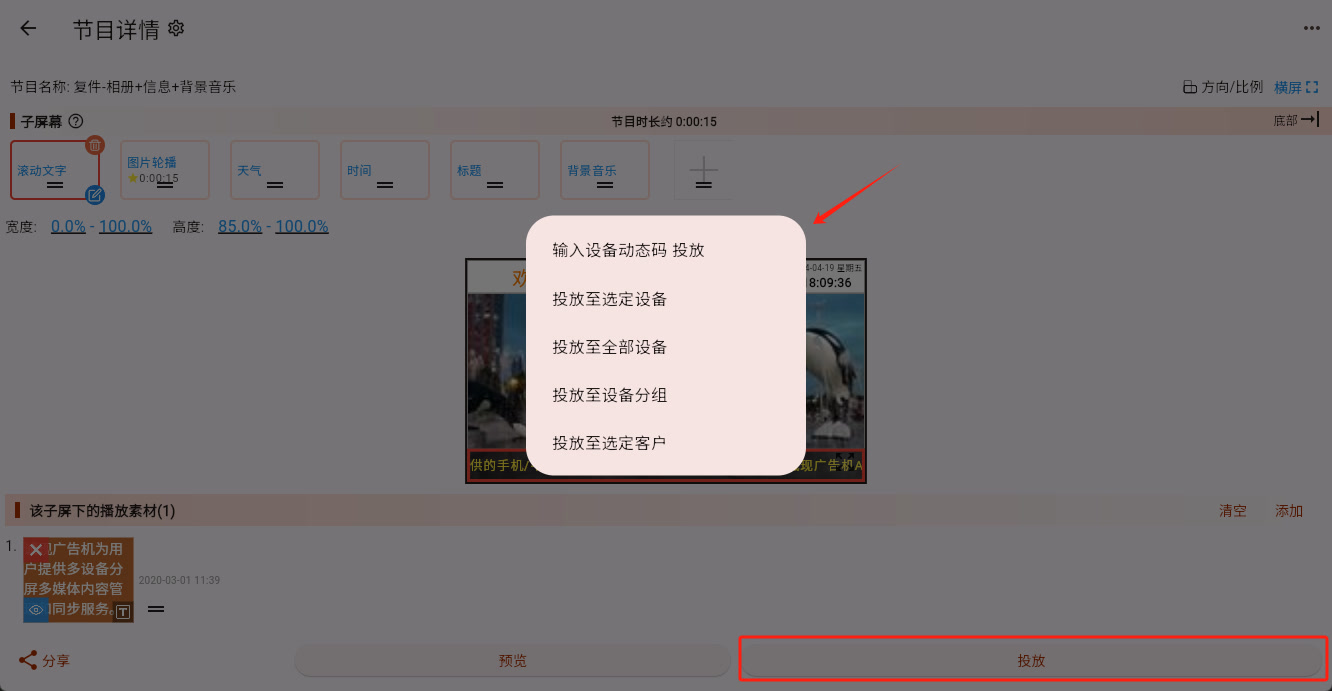
- New device being used for the first time and not yet bound: use "Cast by entering device dynamic code"
- A small number of devices already bound: use "Cast to Selected Device"
- A batch of similar devices already grouped: use "Cast to Device Group"
If you have not actually completed a delivery yet, go directly to Cast.
If you already know how to deliver a program, but want one device to play different programs at different times, continue with Play Plan.