
Child Program Material
Child program material embeds another program inside the current program. It is useful for reusing existing programs, building complex layouts, or inserting a shared content module into multiple programs.
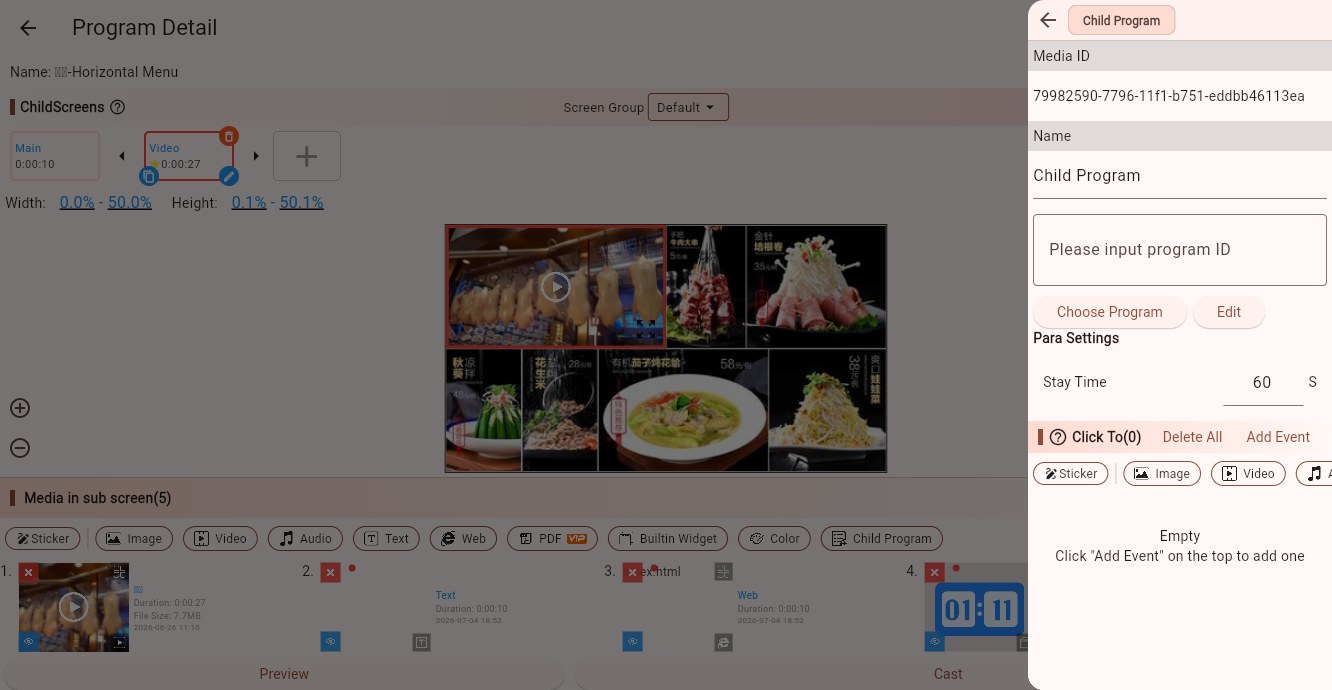
What Is a Child Program?
Normal media is usually an image, a video, a text block, or a web page. Child program material plays another complete program.
For example:
- You already have a "brand footer" program and want to reuse it in multiple store programs.
- You have a shared "weather + clock + store info" module used by many programs.
- You want to split a complex display into several programs and combine them in a main program.
These scenarios are good fits for child program material.
Select a Child Program
In the parameter panel, you can:
- Enter a program ID manually.
- Click "Choose Program" and select an existing program from the list.
- Click "Edit" to open and edit the selected child program.
Using "Choose Program" is recommended because it avoids copying the wrong ID.
Parameters
Program ID
The ID of the program to embed. This determines which program is played by this media item.
Stay Time
Controls how long the child program material stays in the current child screen. The default is usually 60 seconds.
If the embedded program is long, increase the stay time. Otherwise, the child program may switch away before it finishes.
Tips
Child programs are useful for shared modules, but avoid excessive nesting. Deep nesting makes programs harder to maintain and can increase loading pressure on devices.
Do not create circular references. For example, program A embeds B, while B embeds A. This can cause playback problems.
If you only need split-screen layout in one program, use child screens first. Use child program material only when you need to reuse another complete program.
Click Events
Child program material supports click events. Use them in touch-screen scenarios to switch content or open a web page. Normal nested playback usually does not need click events.