
Central Control Protocol API Documentation
This document describes the control protocol for display terminals running on TVs or advertising machines, facilitating integration with central control systems. Both WebSocket and UDP are supported.
HOST Path
- HOST + PORT:
http://192.168.1.10:9393
Replace the IP with your own machine's IP.
Connection Info
- Path:
/ws - Protocol: WebSocket
- Authentication: ACCESS_TOKEN must be sent immediately after connection
You can also connect directly via UDP by sending UDP packets to port 9393, which is convenient for central control integration.
The ACCESS_TOKEN can be obtained from the device details page.
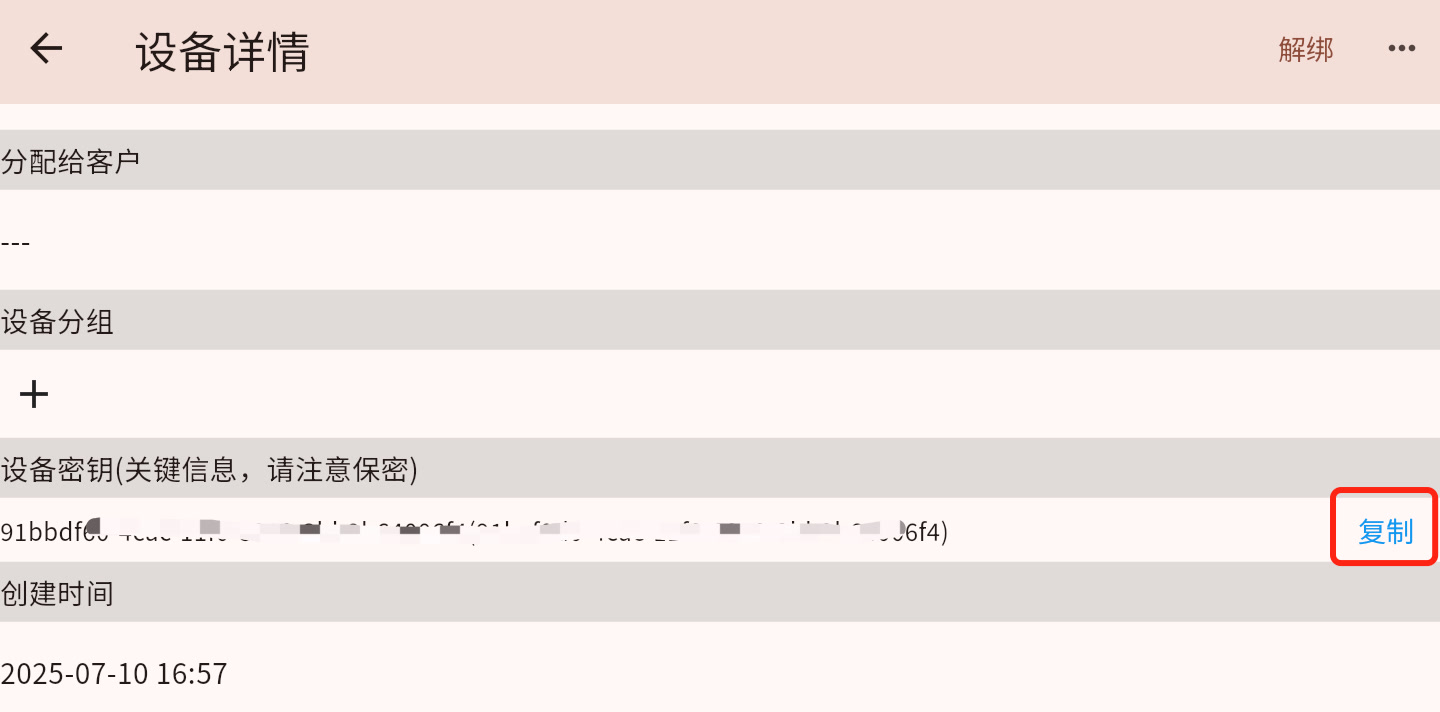
Message Format
All messages are in JSON format, following the RpcCmd structure:
json
{
  "method": "Command method",
  "params": {
    "t": "Message type",
    "idx": "Message ID (optional)",
    "p": "Parameter (optional)",
    "v": "Value (optional)"
  }
}
Message Types (t)
| Type | Description |
|---|---|
| q | Request |
| s | Success Response |
| se | Error Response |
| sd | Processed Response |
Command List
1. Device Authentication (lanAuth)
- Method:
lanAuth - Params:json
{ "method": "lanAuth", "params": { "t": "q", "p": "Device credential" } } - Success Response:json
{ "method": "lanAuth", "params": { "t": "s", "v": "OK" } } - Failure Response:json
{
  "method": "lanAuth",
  "params": {
    "t": "se",
    "v": "Error message"
  }
}
2. Report Device Attributes (postAttrs)
- Method:
postAttrs - Params:json
{ "method": "postAttrs", "params": { "t": "q", "v": { "Attribute1": "Value1", "Attribute2": "Value2" } } } - Response:json
{
  "method": "postAttrs",
  "params": {
    "t": "s",
    "v": "OK"
  }
}
3. Server-to-Device RPC Commands
- Request Format:json
{ "method": "Command name", "params": { "t": "q", "idx": 123, // Unique request ID "p": "Parameter", "v": "Value" } } - Device Response Format:json
{
  "method": "Command name",
  "params": {
    "t": "s",  // or "se" for error
    "idx": 123, // Same as request ID
    "v": "Response value"
  }
}
Supported RPC Commands
ping (Connectivity Test)
- Request:json
{ "method": "ping", "params": {"t": "q"} } - Response:json
{
  "method": "ping",
  "params": {
    "t": "s",
    "v": "pong"
  }
}
getPlayerStatus (Get Player Status)
- Response:json
{
  "ver": "Version",
  "info": "Device info",
  "curTs": "Current timestamp",
  "curMHCast": "Current program description",
  "curPlay": "Current playback info",
  "taskLen": "Task count",
  "playTaskList": "Playback task list",
  "httpServerInfo": "HTTP server info"
}
getScreenshot (Get Screenshot)
- Request:json
{ "method": "getScreenshot", "params": { "t": "q", "v": 49000 // Max bytes } } - Response:json
{
  "method": "getScreenshot",
  "params": {
    "t": "s",
    "v": "base64 image data"
  }
}
update_cast (Update Program)
- Trigger Event: Update program info on device
updateDevice (Update Device Info)
- Trigger Event: Refresh device info
settings (Device Settings)
- Read settings:json
{ "method": "settings", "params": { "t": "q", "p": "Setting name" } } - Update settings:json
{
  "method": "settings",
  "params": {
    "t": "qs",  // Setting request
    "p": "Setting name",
    "v": "Setting value"
  }
}
remoter (Remote Control Event)
- Request:json
{ "method": "remoter", "params": { "t": "qs", "p": "Key type", "v": true } } - Supported key types:
- "up", "down", "left", "right"
- "select", "back"
- "0"-"9"
- "backward", "forward"
installApp (Install Application)
- Request:json
{
  "method": "installApp",
  "params": {
    "t": "qs",
    "p": "info",
    "v": {
      "url": "App download URL",
      "desc": "App description"
    }
  }
}
Connection Lifecycle
- Establish WebSocket connection
- Must send
lanAuthauthentication within 10 seconds - After successful authentication, other operations are allowed
- Device will be marked offline after disconnecting
Error Handling
- Unsupported command:json
{ "params": { "t": "se", "p": "NOT_SUPPORT" } } - Authentication failed:json
{ "params": { "t": "se", "v": "Error message" } } - Request timeout: 30 seconds without response is considered timeout